> ## Documentation Index
> Fetch the complete documentation index at: https://connect.watson-orchestrate.ibm.com/llms.txt
> Use this file to discover all available pages before exploring further.
# Pricing and metering
> Identify the pricing and metering model you want to offer your customers.
IBM Cloud supports multiple pricing and metering options that you can adopt for your product. Before defining your plan, review the IBM Cloud pricing models to determine which structure best aligns with how your service delivers value.
To generate revenue from IBM Cloud usage-based plans, you must accurately collect and submit usage data. This ensures customers are billed correctly and consistently. Usage submissions must follow IBM Cloud timing requirements (for example, hourly reporting for certain metered plans). Automated reporting is strongly recommended.
## Important requirements
On your IBM Concierge app pricing page, provide your:
* [Export Control Classification Number (ECCN) ](https://www.bis.gov/licensing/classify-your-item#WhatisanECCN?)
* [United Nations Standard Products and Services Code (UNSPSC) ](https://help.ungm.org/hc/en-us/articles/360013132940-How-to-select-UNSPSC-codes)
These classifications are required for publishing a pricing plan.
## Simplified calculation
Most usage-based plans follow this basic structure:
> Revenue = Price × Quantity
* **Price**: Amount charged per unit of usage
* **Quantity**: Metering unit that defines how usage is measured
## Pricing models
The following are the common pricing models supported by IBM Cloud.
### Linear pricing
A simple model where all usage is billed at a single per-unit price.
**How it works**
* Formula: **T = P × Q**
* Every unit costs the same, regardless of volume.
**Example (Q = 5,000)**
* Price (P): \$1
* **Total: 1 × 5,000 = \$5,000**
### Simple tier (Granular tier)
The entire usage is billed at the price of the tier into which the total quantity falls.
**How it works**
* If **Q ≤ Q1** → **T = P1 × Q**
* If **Q1 \< Q ≤ Q2** → **T = P2 × Q**
* If **Q2 \< Q ≤ Q3** → **T = P3 × Q**
**Example (Q = 5,000)**
* Tier 1: Q1 = 1,000, P1 = \$1
* Tier 2: Q2 = 2,500, P2 = \$0.90
* Tier 3: Q3 = 10,000, P3 = \$0.75
* Quantity 5,000 falls into Tier 3
* **Total: 0.75 × 5,000 = \$3,750**
### Graduated tier (Step tier)
Each tier is charged separately. Usage accumulates across tiers.
**How it works**
* First Q1 units billed at P1
* Next tier billed at P2
* Remaining units billed at P3
* Total = Sum of all tier charges
**Example (Q = 5,000)**
* Tier 1: 1,000 × \$1 = 1,000
* Tier 2: 1,500 × \$0.90 = 1,350
* Tier 3: 2,500 × \$0.75 = 1,875
* **Total: \$4,225**
## Pricing model comparsion
| Pricing model | How pricing behaves | Best used when… | Example scenarios |
| -------------------------- | ---------------------------------------------------------------------- | --------------------------------------------------------------------------------- | ---------------------------------------------------------------- |
| **Linear** | Same price per unit, regardless of usage volume. | You want simple, predictable billing. | Flat rate per message, per document, per active user. |
| **Simple tier (granular)** | Entire usage billed at the price of the tier the total falls into. | You want to incentivize increasing usage without complex billing. | Discounts applied when customers cross certain usage thresholds. |
| **Graduated tier (step)** | Each tier is priced separately; total cost is cumulative across tiers. | You want progressive discounts as usage grows, similar to cloud platform pricing. | Cloud resource metering, telecom plans, API-based consumption. |
***
## watsonx Orchestrate Partner Agent Price Plans and Metering
To enable customer purchases, sales workflows, and billing for partner agent services, you must register your agent offering in the IBM Cloud Catalog. As part of onboarding, you must define:
* **Price plans**
* **Usage metrics**
Traditional SaaS metering often revolves around instance count or user licenses. However, watsonx Orchestrate (wxO) agent-based solutions rely on activity and outcome-driven metrics that better represent how intelligent agents work.
### Recommended meter types for wxO agents
Metrics should reflect how agents operate or deliver value. Common examples include:
* **Messages** — Discrete exchanges between agents, users, or systems
* **Active User** — Unique users who engage with the agent
* **Monthly Active Users (MAU)** — User count over a calendar month
* **Voice MAU** — Users interacting through voice-based channels
* **Document** — A processed, generated, or retrieved document
* **Event** — A Tool Run (execution of a tool within an agent)
* Tool Runs represent individual actions such as creating a table or sending a message
* Multi‑step sequences (tool flows) count each action as an individual Event
* Tool Runs executed in preview mode do **not** count toward consumption
***
# **Pricing Models for Agent Services**
Agent pricing can follow different approaches depending on how value is delivered.
### **Fixed Plan (Agent-Oriented)**
* Flat monthly fee for access to agent capabilities
* Example: A customer pays a single monthly price regardless of usage
### **Usage-Based Plan**
* Pricing tied to actual consumption (messages, documents, events, etc.)
* Example: A fee per 100 messages exchanged
### **Hybrid Plan (Fixed + Usage-Based)**
* Base fixed fee includes a bundled usage amount, with additional charges for extra usage
* Example: Plan includes 5,000 messages; extra messages billed in increments
***
# **Create a Price Plan and Usage Metrics**
1. Log in to **IBM Cloud → Concierge → My Products**.
2. Select **Pricing** from the left navigation.
3. Enter your **ECCN** and **UNSPSC**.
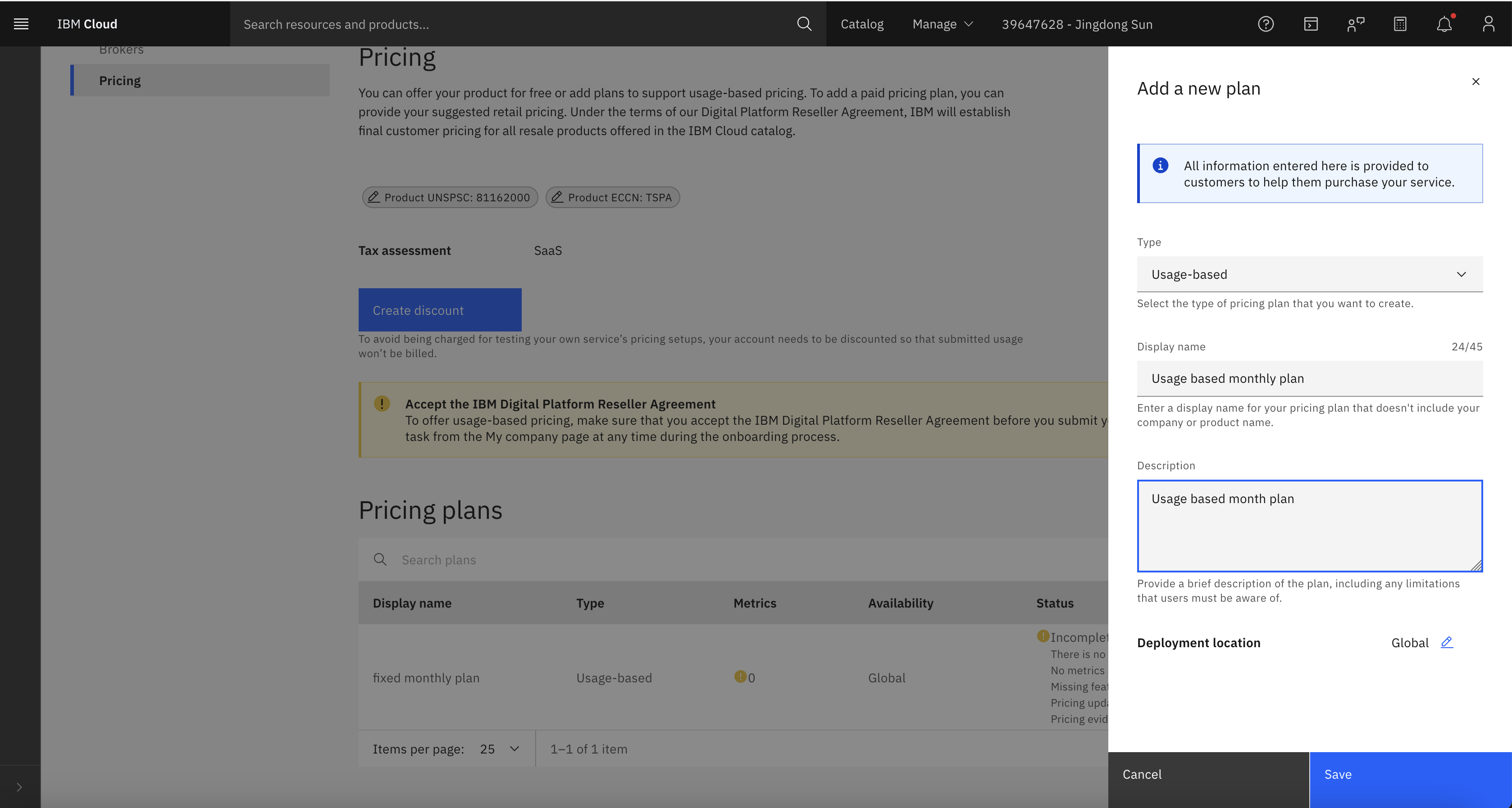
4. Under **Pricing Plan**, select **Add Plans** and create a new plan (for example, a usage-based plan).\\
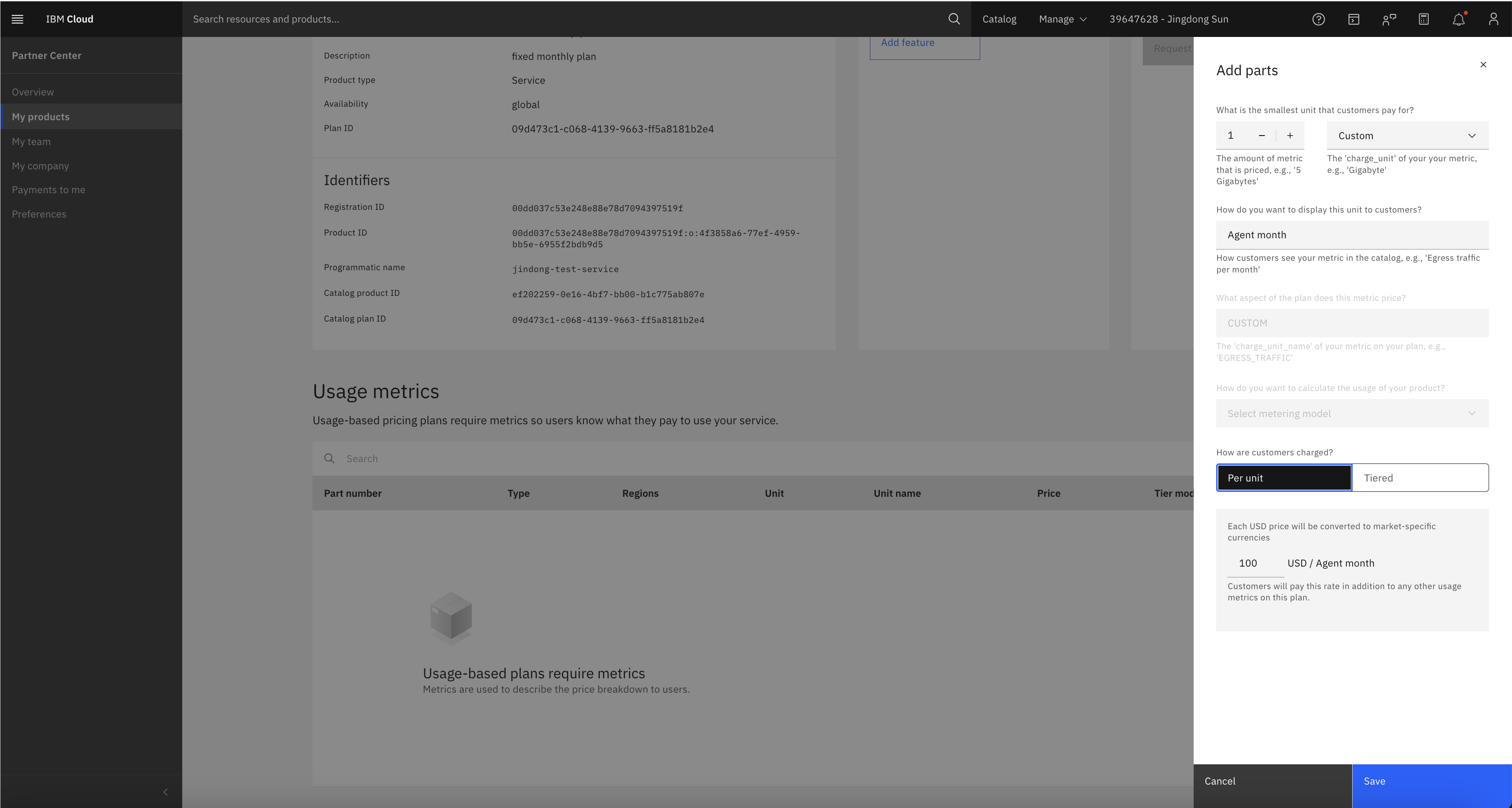
 5. Open the plan and choose **Add metric**.
* To add a **usage-based** metric:\\
5. Open the plan and choose **Add metric**.
* To add a **usage-based** metric:\\
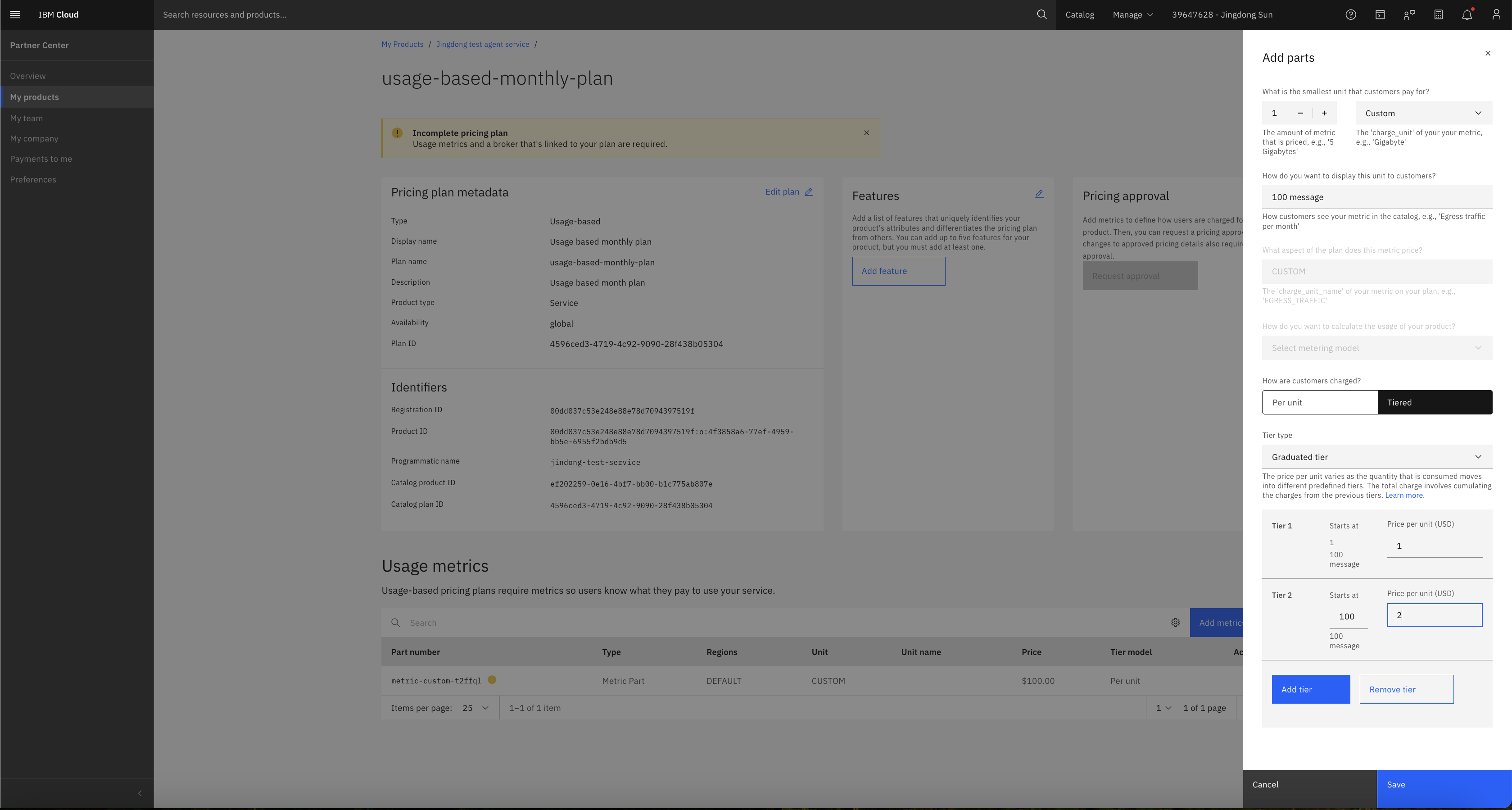 * To add a **fixed** metric:\\