

What is a Service Broker

A service broker manages the lifecycle of services. Platforms interact with service brokers to create, access, and manage services. The broker functions as middleware, handling automatic provisioning of service instances and tracking their usage.

How the Partner Service Broker Works

When a user creates or purchases a service from the IBM Cloud Catalog, the process includes:
  1. IBM Cloud validates the user’s permission to create the service instance using IBM Cloud IAM.
  2. The platform associates the user with the service instance and selected pricing plan, generating a unique Cloud Resource Name (CRN).
  3. Based on service specifications and user input, the partner service broker provisions the service instance or sets up the environment by calling the broker’s creation endpoint.
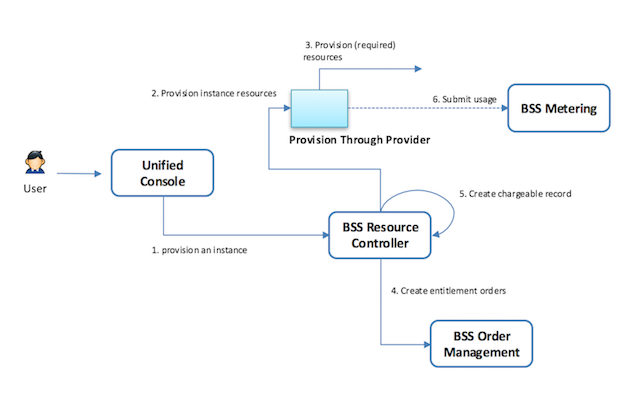
The IBM Cloud Resource Controller performs the first two steps. The partner service broker handles the third step, which includes: Service Broker Flow
  1. Provisioning new service instances according to the catalog and pricing plan.
  2. Connecting or disconnecting applications and containers from service instances.
  3. Deprovisioning service instances.

watsonx Orchestrate Partner Agent Service Broker

Onboarding watsonx Orchestrate (wxO) partner agents or tools requires registering them in the IBM Cloud Catalog for sales, purchase, and billing. Partners must create a service broker for their agents. However, because the IBM Cloud Catalog targets SaaS offerings, wxO partners may not need to implement the full provisioning lifecycle or all service broker endpoints.

Design Considerations

When designing a service broker, consider:
  1. Authentication: Review IBM Cloud authentication options and choose the best fit.
  2. Deployment Model: Determine how agents or tools are deployed and how customers will use them. This affects the broker’s required functionality.
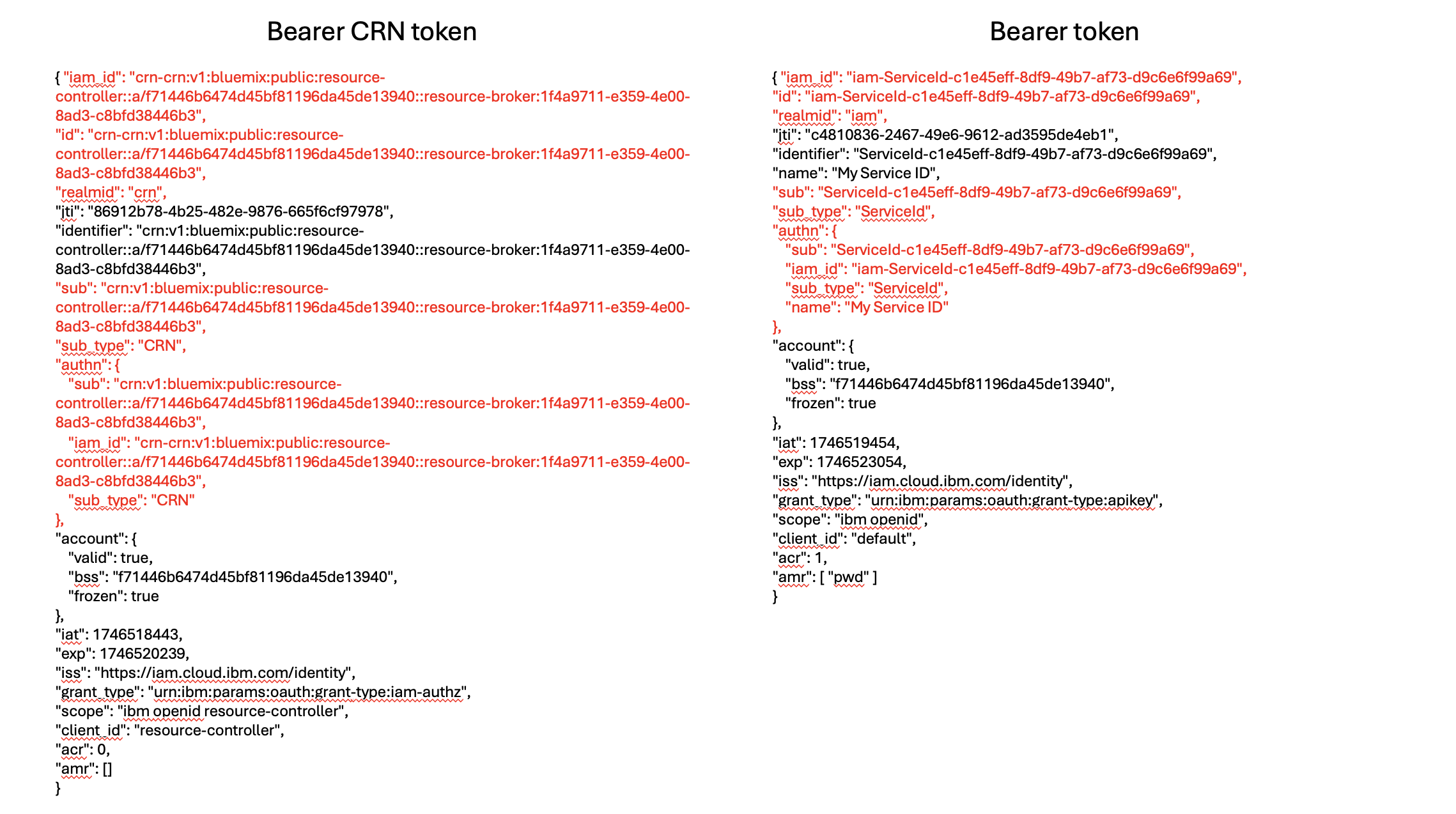
Here’s a comparison between IBM Cloud’s recommended Bearer CRN token and the Bearer token: Comparison between CRN token and Bearer token

Authentication

Partners must follow IBM Cloud authentication guidelines. IBM recommends using Bearer CRN tokens or Bearer tokens. See the following code for JWT authorization example:
authorization_middleware.ts
import crypto, { JsonWebKey } from 'node:crypto'
import { RequestHandler } from 'express'
import jwt from 'jsonwebtoken'
import axios from 'axios'

import logger from '../utils/logger'

const KEYS_ENDPOINT = `${process.env.IAM_ENDPOINT as string}/identity/keys`

interface IAMIdentityKeysResponse {
  keys: JsonWebKey[]
}

interface AuthenticatorParams {
  basicAuthUsername: string
  basicAuthPassword: string
  allowlistedIds: string[]
}
export class Authenticator {
  private IAMPublicKeys: JsonWebKey[] = []
  private basicAuthUsername: string
  private basicAuthPassword: string
  private allowlistedIds: Set<string>
  private basicCredential: string
  private intervalHandle: NodeJS.Timeout | undefined

  public static async build(params: AuthenticatorParams) {
    const instance = new Authenticator(params)
    await instance.init()
    return instance
  }

  constructor({
    allowlistedIds,
    basicAuthPassword,
    basicAuthUsername,
  }: AuthenticatorParams) {
    this.allowlistedIds = new Set(allowlistedIds)
    this.basicAuthPassword = basicAuthPassword
    this.basicAuthUsername = basicAuthUsername
    this.basicCredential = Buffer.from(
      `${basicAuthUsername}:${basicAuthPassword}`,
    ).toString('base64')
  }

  private async fetchIdentityKeys(): Promise<JsonWebKey[]> {
    try {
      const resp = await axios.get<IAMIdentityKeysResponse>(KEYS_ENDPOINT)
      return resp.data.keys
    } catch (e) {
      logger.error(`Error fetching IAM Identity keys ${e}`)
      throw e
    }
  }

  public async init(): Promise<void> {
    this.IAMPublicKeys = await this.fetchIdentityKeys()
    const to = setInterval(
      async arg => {
        arg.IAMPublicKeys = await arg.fetchIdentityKeys()
      },
      20 * 60 * 1000,
      this,
    )
    to.unref()
    this.intervalHandle = to
  }

  private verifyJWT(credential: string): string | jwt.JwtPayload {
    const decodedToken = jwt.decode(credential, { complete: true })
    if (!decodedToken) {
      throw new Error('token could not be decoded')
    }
    const { kid, alg } = decodedToken.header
    const matchingKey = this.IAMPublicKeys.find(
      key => key.kid === kid && key.alg === alg,
    )

    if (!matchingKey) {
      logger.error('could not find matching key for token validation')
      throw new Error('invalid token')
    }
    try {
      return jwt.verify(
        credential,
        crypto.createPublicKey({
          key: matchingKey,
          format: 'jwk',
        }),
      )
    } catch (e) {
      logger.error(e)
      throw new Error('invalid token')
    }
  }

  private authorizeBasicCredential(credential: string): boolean {
    return credential === this.basicCredential
  }

  private authorizeBearerCredential(credential: string): boolean {
    let token
    try {
      token = this.verifyJWT(credential)
    } catch (e) {
      logger.error('invalid token')
      return false
    }
    if (typeof token !== 'object') {
      logger.error('invalid token type')
      return false
    }
    const { id } = token
    if (!this.allowlistedIds.has(id)) {
      logger.error('identity not allowed')
      return false
    }
    return true
  }

  public authorizeRequest: RequestHandler = (req, res, next) => {
    const authHeader = req.headers['authorization']

    if (!authHeader) {
      logger.warn('Authorization header is missing')
      return res.sendStatus(401)
    }

    const [authType, credentials] = authHeader.split(' ')

    if (!authType) {
      return res.sendStatus(401)
    }

    if (!credentials) {
      return res.sendStatus(401)
    }

    switch (authType.toLowerCase()) {
      case 'basic':
        if (!this.authorizeBasicCredential(credentials)) {
          return res.sendStatus(403)
        }
        break
      case 'bearer':
        if (!this.authorizeBearerCredential(credentials)) {
          return res.sendStatus(403)
        }
        break
      default:
        return res.sendStatus(401)
    }
    next()
  }
}

Partner Agent Scenarios

External Agents

Partners host agents in their own environment. Customers access these agents via predefined URLs or APIs. The broker must:
  • Return credentials or access details (e.g., token, URL).
  • Provision customer-specific deployments or environments as needed.

Native Agents

Partners host agents within watsonx Orchestrate. In most cases, the broker does not need to provision resources because agents run on the watsonx Orchestrate platform. The broker may only return IBM Cloud Resource Controller context. If additional setup is required (e.g., creating a customer-specific knowledge base), the broker must:
  • Perform the necessary setup based on customer input, or
  • Provide credentials for the customer to complete the setup.

Partner Tools

Partners provide tools that connect to services or databases. The broker must return URLs, API keys, or credentials to enable tool usage.

Implement, Test, and Onboard

  • Implementation: See the following example Python implementation:
    service_broker.py
    import asyncio
    from abc import ABC, abstractmethod
    from typing import Optional, Dict, Any
    import json
    
    class Context:
        def __init__(self, details: Any):
            my_dict = json.loads(details)
            self.account_id = my_dict["account_id"]
            self.resource_group_crn = my_dict["resource_group_crn"]
            self.target_crn = my_dict["target_crn"]
            self.name = my_dict["name"]
            self.crn = my_dict["crn"]
            self.platform = my_dict["platform"]
    
    class CreateServiceInstanceResponse:
        def __init__(self, instance_id: str, status: str, context: Optional[Context], metadata: Optional[Dict[str, Any]]):
            self.instance_id = instance_id
            self.status = status
            self.context = context
            self.metadata = metadata
    
    class Catalog:
        def __init__(self, items: list[str]):
            self.items = items
    
    class BrokerService(ABC):
        @abstractmethod
        async def provision(self, instance_id: str, details: Any, iam_id: str, region: str) -> CreateServiceInstanceResponse:
            pass
    
        @abstractmethod
        async def deprovision(self, instance_id: str, plan_id: str, service_id: str, iam_id: str) -> bool:
            pass
    
        @abstractmethod
        async def last_operation(self, instance_id: str, iam_id: str) -> str:
            pass
    
        @abstractmethod
        async def import_catalog(self, file_path: str) -> str:
            pass
    
        @abstractmethod
        async def get_catalog(self) -> Catalog:
            pass
    
        @abstractmethod
        async def update_state(self, instance_id: str, update_data: Any, iam_id: str) -> str:
            pass
    
        @abstractmethod
        async def get_state(self, instance_id: str, iam_id: str) -> str:
            pass
    
    # This class to demo no-op provision, return context for customer reference
    class NoopBrokerServiceImpl(BrokerService):
        def __init__(self):
            self.instances = {}
            self.catalog = Catalog(items=["basic", "premium"])
    
        async def provision(self, instance_id: str, details: Any, iam_id: str, region: str) -> CreateServiceInstanceResponse:
            context = Context(details)
            return CreateServiceInstanceResponse(instance_id, "no-op", context, None)
    
        async def deprovision(self, instance_id: str, plan_id: str, service_id: str, iam_id: str) -> bool:
            return True
    
        async def last_operation(self, instance_id: str, iam_id: str) -> str:
            return "no-op"
    
        async def import_catalog(self, file_path: str) -> str:
            return "no-op"
    
        async def get_catalog(self) -> Catalog:
            return self.catalog
    
        async def update_state(self, instance_id: str, update_data: Any, iam_id: str) -> str:
            return "no-op"
    
        async def get_state(self, instance_id: str, iam_id: str) -> str:
            return "no-op"
    
    # This class to demo a simple provision to return some metadata for customer usage.
    class SimpleBrokerServiceImpl(BrokerService):
        def __init__(self):
            self.instances = {}
            self.catalog = Catalog(items=["basic", "premium"])
    
        async def provision(self, instance_id: str, details: Any, iam_id: str, region: str) -> CreateServiceInstanceResponse:
            self.instances[instance_id] = {"details": details, "iam_id": iam_id, "region": region, "state": "provisioned"}
            metadata = self._metadataCreation()
            return CreateServiceInstanceResponse(instance_id, "provisioned", details, metadata)
    
        def _metadataCreation(self) -> Dict:
            # Creating some metadata based on business operation requirements, for example, customer specific
            # remote access token, userId and password, some remote url, etc.
            metadata = {"user_id": "my_id", "token": "this_token"}
            return metadata
    
        async def deprovision(self, instance_id: str, plan_id: str, service_id: str, iam_id: str) -> bool:
            if instance_id in self.instances:
                del self.instances[instance_id]
                return True
            return False
    
        async def last_operation(self, instance_id: str, iam_id: str) -> str:
            return self.instances.get(instance_id, {}).get("state", "unknown")
    
        async def import_catalog(self, file_path: str) -> str:
            # For simplicity, assume each line in file is a catalog item
            with open(file_path, "r") as f:
                self.catalog.items = [line.strip() for line in f.readlines()]
            return "Catalog imported successfully"
    
        async def get_catalog(self) -> Catalog:
            return self.catalog
    
        async def update_state(self, instance_id: str, update_data: Any, iam_id: str) -> str:
            if instance_id in self.instances:
                self.instances[instance_id].update(update_data)
                return "updated"
            return "not found"
    
        async def get_state(self, instance_id: str, iam_id: str) -> str:
            return self.instances.get(instance_id, {}).get("state", "not found")
    
    async def main():
        broker = SimpleBrokerServiceImpl()
        res = await broker.provision("123", {"plan": "basic"}, "iam1", "us-south")
        print(res.instance_id, res.status)
    
        state = await broker.get_state("123", "iam1")
        print("State:", state)
    
        await broker.update_state("123", {"state": "running"}, "iam1")
        print("Updated state:", await broker.get_state("123", "iam1"))
    
        print("Deprovisioned:", await broker.deprovision("123", "plan1", "svc1", "iam1"))
    
    if __name__ == "__main__":
        asyncio.run(main())
    
  • Setup and Testing:
  • Onboarding: Add the broker in IBM Cloud Partner Center .

Questions & Answers

Q1: What is the “Setup SSO” option in IBM Cloud Partner Center?

This optional feature enables IBM Cloud single sign-on for your service and allows adding redirect URLs for authentication and authorization. See IBM Cloud SSO documentation for details.